
One Inbox for Every Channel: Stop Your Sales From Leaking
Contents
A customer saw an Instagram ad and sent a DM: "Do you have this in size M?". No answer within the hour, so she went to the website and asked the same thing in the chat. Still nothing - so she sent a WhatsApp message. Eventually someone replied on WhatsApp, asked her to explain again what she was looking for, and had no idea she'd already asked twice on other channels. This isn't an edge case - it's the default in most businesses today. This guide is about turning that mess into one inbox that works.
Multichannel is not omnichannel
Most businesses think they're "on every channel" - they have an Instagram page, a business WhatsApp and a website chat. But that's multichannel: many separate inboxes, each with its own history, each managed (or not) by someone else.
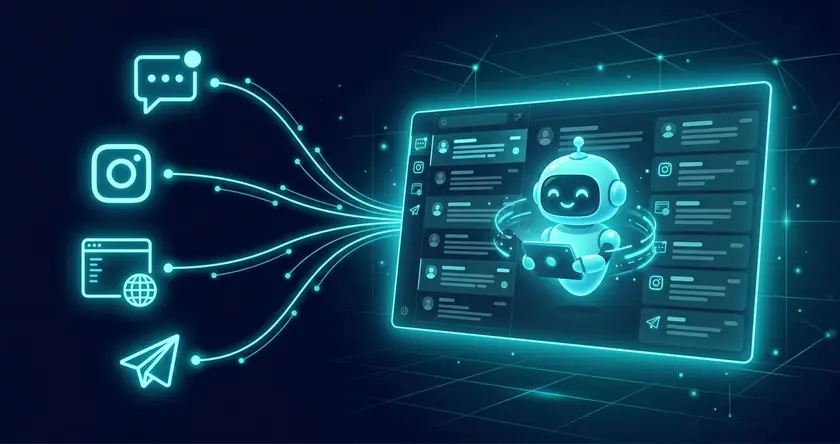
Omnichannel is something entirely different: all channels connect to one brain, one history and one CRM. The customer moves from channel to channel - and the system continues the conversation from where it left off. That difference is the difference between "we have a presence" and "we don't miss anyone".
Where exactly the sales leak
- A message nobody saw. An Instagram DM falls between the manager who posts and whoever answers WhatsApp. No one is sure it's theirs.
- The customer retells the story. Moving between channels = repeating everything. A frustrating experience, and another chance they'll give up.
- A follow-up that never happens. When a conversation started on Instagram and ended without closing, nobody comes back to it - it isn't logged anywhere central.
- No full picture of the customer. You can't give good service to someone whose full history you can't see - what they bought, what they asked, when they last reached out.
How a unified inbox with an AI agent solves it
- One brain across all channels: the same AI agent answers on WhatsApp, the website widget (text and voice), Instagram, Facebook and Telegram - with the same knowledge and the same tone.
- History that continues across channels: an identified customer gets a seamless continuation, without repeating themselves. All their conversations merge into one card.
- Every inquiry captured and logged: no message falls through the cracks. Every inquiry from every channel enters the CRM, gets an instant reply, and whoever didn't close gets an automatic follow-up.
- An alert to you with full context: for every new lead - an email with an AI summary, including which channel it came from and what was asked.
- Your data, in one place: instead of history scattered across Meta, Telegram and your website's inboxes - everything in the WhaleBiz CRM you control, with full export anytime.
Multichannel vs omnichannel: the difference in practice
| Situation | Multichannel (separate inboxes) | Omnichannel (unified inbox) ✓ |
|---|---|---|
| Customer moves between channels | Retells the story | Conversation continues from where it left off |
| Who's responsible for answering | Unclear, falls through the cracks | The agent answers everyone, instantly |
| Customer history | Scattered across apps | One unified card |
| Lead follow-up | Manual, usually never happens | Automatic across all channels |
| Data control | With the platforms | In your CRM, exportable |
Want to consult with us?
We can help you choose, build and deploy the perfect AI solution for your business. Leave your details and we'll get back to you.
How to move to omnichannel the right way: 4 steps
- Map where customers come from. Most businesses are surprised to find that a channel they neglect (like Instagram or Telegram) brings a significant share of inquiries. Start with the hottest channel.
- Unify the knowledge. Instead of different wording on each channel - one knowledge base the agent answers from everywhere, consistent and precise.
- Set up customer identification. By phone number or provided details, so conversations merge into one card. This is what turns "many channels" into "one customer".
- Define when it goes to a human. Most inquiries close automatically; whatever needs a human touch goes to you - with the full history, from every channel, in one place.
Deciding which channel to start with? We wrote a focused comparison: WhatsApp bot or website bot - the right choice. And if you first want to understand how an AI agent differs from a scripted chatbot - here is the full explanation of AI agents.
What it costs
A unified inbox across channels starts on the Standard plan (channels including WhatsApp) and on the Business plan (more channels in parallel) - both include a CRM, unlimited follow-ups and all AI consumption. Full details and comparison - on the plans page.
Frequently Asked Questions
What is the difference between multichannel and omnichannel?
Multichannel means you are present on many channels - but each is separate, with its own history. Omnichannel means all channels connect to one brain and one history: the customer can move from Instagram to WhatsApp to your website, and the system remembers them and the conversation the whole way.
Does the agent remember a customer who moved from one channel to another?
Yes. When the same customer is identified (e.g. by phone number or details they provided), all their conversations from every channel merge into one customer card in the CRM, so they don't have to repeat themselves and you see the full picture.
Which channels can be connected?
WhatsApp, a text and voice chat widget on your website, Instagram, Facebook Messenger and Telegram - all managed by the same AI agent from the same system. The Standard plan includes channels including WhatsApp, and the Business plan more channels in parallel.
Why does it matter to manage everything from one place?
Because inquiries scattered across people and apps are inquiries that fall through the cracks: an Instagram message nobody saw, a customer who told the story twice, a lead that never got a follow-up. A unified inbox ensures every inquiry, from every channel, gets answered and saved.
Is the data from all channels really mine?
Yes. Every conversation from every channel is stored in the WhaleBiz CRM that you own, with full export at any moment - unlike a situation where history is scattered across inboxes of different platforms you don't control.

Michael Romm
Michael is the founder and CEO of WhaleBiz, leading business and marketing strategy. An expert in data (SQL, Python) and developing automation and AI solutions for businesses.